
Turn the Web into Clean Data for AI
Built to power the Web's second user, Olostep is the best web search, scraping and crawling API for AI

-
 Start "research YC" workflow
 -
 Automate brand protection
 -
 Research donors in NYC
 Find local businesses
 -
 Analyze brand visibility





· Parsers - structured data
· Data router
· Automation engine
· Click, fill forms
· Distributed infra
· Map/Crawl
· VM sandboxes
· Batches API
{
"id": "request_56is5c9gyw",
"created": 1317322740,
"result": {
"markdown_content": "# Ex", "json_content": {}
"html_content": "<DOC>"
}
}





















...and many more
Diagonal Sections
Using the rotation transform is how you might think to do it but I think skew is the way to go!
Search, scrape, structure and monitor the whole web with one API key. Reliable, cost-effective, scalable. Handling Billions of requests
/agents
Built for Developers
Object-oriented API, native Python and NodeJS SDK clients, metadata support, webhook events, easy to try and easy to scale


Get clean data from any URL



1# pip install olostep
2from olostep import Olostep
3
4client = Olostep(api_key="YOUR_REAL_KEY")
5
6result = client.scrapes.create(
7    url_to_scrape="https://en.wikipedia.org/wiki/Alexander_the_Great",
8    formats=["markdown", "html"],
9)
10
11print(result.markdown_content)
12print(result.html_content)1// npm i olostep
2import Olostep from 'olostep'
3
4const client = new Olostep({ apiKey: 'YOUR_REAL_KEY' })
5
6const result = await client.scrapes.create({
7 url: 'https://en.wikipedia.org/wiki/Alexander_the_Great',
8 formats: ['markdown', 'html'],
9})
10
11console.log(result.markdown_content)
12console.log(result.html_content)1curl -s -X POST "https://api.olostep.com/v1/scrapes" \
2 -H "Authorization: Bearer <YOUR_API_KEY>" \
3 -H "Content-Type: application/json" \
4 -d '{
5 "url_to_scrape": "https://en.wikipedia.org/wiki/Alexander_the_Great",
6 "formats": ["markdown", "html"]
7 }'


Crawl all the subpages
1# pip install olostep
2from olostep import Olostep
3
4client = Olostep(api_key="YOUR_REAL_KEY")
5
6crawl = client.crawls.create(
7    start_url="https://olostep.com",
8    max_pages=100,
9    include_urls=["/**"],
10    exclude_urls=["/collections/**"],
11    include_external=False,
12)
13
14print(crawl.id, crawl.status)
15
16# Wait for completion and iterate pages
17for page in crawl.pages():
18    print(page.url)
19    content = page.retrieve(["markdown"])
20 print(content.markdown_content[:200])1// npm i olostep
2import Olostep from 'olostep'
3
4const client = new Olostep({ apiKey: 'YOUR_REAL_KEY' })
5
6const crawl = await client.crawls.create({
7 url: 'https://olostep.com',
8 maxPages: 100,
9 includeUrls: ['/**'],
10 excludeUrls: ['/collections/**'],
11 includeExternal: false,
12})
13
14console.log(crawl.id, crawl.status)
15
16// Wait for completion and iterate pages
17for await (const page of crawl.pages()) {
18 console.log(page.url)
19 const content = await client.retrieve({ retrieveId: page.retrieve_id, formats: ['markdown'] })
20 console.log(content.markdown_content.slice(0, 200))
21}1# Start crawl
2curl -s -X POST "https://api.olostep.com/v1/crawls" \
3 -H "Authorization: Bearer <YOUR_API_KEY>" \
4 -H "Content-Type: application/json" \
5 -d '{
6 "start_url": "https://olostep.com",
7 "max_pages": 100,
8 "include_urls": ["/**"],
9 "exclude_urls": ["/collections/**"],
10 "include_external": false
11 }'
12
13# Check status (replace <CRAWL_ID>)
14curl -s "https://api.olostep.com/v1/crawls/<CRAWL_ID>" \
15 -H "Authorization: Bearer <YOUR_API_KEY>"
16
17# Get pages (replace <CRAWL_ID>)
18curl -s "https://api.olostep.com/v1/crawls/<CRAWL_ID>/pages" \
19 -H "Authorization: Bearer <YOUR_API_KEY>"
20
21# Retrieve content (replace <RETRIEVE_ID>)
22curl -s -G "https://api.olostep.com/v1/retrieve" \
23 -H "Authorization: Bearer <YOUR_API_KEY>" \
24 --data-urlencode "retrieve_id=<RETRIEVE_ID>" \
25 --data-urlencode "formats=markdown"Build, schedule, run agents
1# pip install olostep
2from olostep import Olostep
3
4client = Olostep(api_key="YOUR_REAL_KEY")
5
6sitemap = client.maps.create(
7    url="https://docs.olostep.com",
8    include_urls=["/features/**"],
9    top_n=100,
10)
11
12print(f"Map ID: {sitemap.id}")
13
14# Iterate all URLs (handles pagination automatically)
15for url in sitemap.urls():
16 print(url)1// npm i olostep
2import Olostep from 'olostep'
3
4const client = new Olostep({ apiKey: 'YOUR_REAL_KEY' })
5
6const map = await client.maps.create({
7 url: 'https://docs.olostep.com',
8 includeUrls: ['/features/**'],
9 topN: 100,
10})
11
12console.log(`Map ID: ${map.id}`)
13
14// Iterate all URLs (handles pagination automatically)
15for await (const url of map.urls()) {
16 console.log(url)
17}1curl -s -X POST "https://api.olostep.com/v1/maps" \
2 -H "Authorization: Bearer <YOUR_API_KEY>" \
3 -H "Content-Type: application/json" \
4 -d '{
5 "url": "https://docs.olostep.com",
6 "include_urls": ["/features/**"],
7 "top_n": 100
8 }'Build, schedule, run agents
1# pip install olostep
2from olostep import Olostep
3
4client = Olostep(api_key="YOUR_REAL_KEY")
5
6batch = client.batches.create(
7    urls=[
8        {"custom_id": "item-1", "url": "https://www.google.com/search?q=stripe&gl=us&hl=en"},
9        {"custom_id": "item-2", "url": "https://www.google.com/search?q=paddle&gl=us&hl=en"},
10    ],
11    parser="@olostep/google-search",
12)
13
14print(batch.id, batch.status)
15
16# Wait and iterate results (auto-waits for completion)
17for item in batch.items():
18    content = item.retrieve(["json"])
19    print(item.url, item.custom_id)
20 print(content.json_content)1// npm i olostep
2import Olostep from 'olostep'
3
4const client = new Olostep({ apiKey: 'YOUR_REAL_KEY' })
5
6const batch = await client.batches.create([
7 { url: 'https://www.google.com/search?q=stripe&gl=us&hl=en', customId: 'item-1' },
8 { url: 'https://www.google.com/search?q=paddle&gl=us&hl=en', customId: 'item-2' },
9], {
10 parser: '@olostep/google-search',
11})
12
13console.log(batch.id, batch.total_urls)
14
15// Wait and iterate results (auto-waits for completion)
16for await (const item of batch.items()) {
17 const content = await item.retrieve(['json'])
18 console.log(item.url, item.custom_id)
19 console.log(content.json_content)
20}1curl -s -X POST "https://api.olostep.com/v1/batches" \
2 -H "Authorization: Bearer <YOUR_API_KEY>" \
3 -H "Content-Type: application/json" \
4 -d '{
5 "items": [
6 {"custom_id": "item-1", "url": "https://www.google.com/search?q=stripe&gl=us&hl=en"},
7 {"custom_id": "item-2", "url": "https://www.google.com/search?q=paddle&gl=us&hl=en"}
8 ],
9 "parser": {"id": "@olostep/google-search"}
10 }'Semantically search the Web
1# pip install olostep
2from olostep import Olostep
3
4client = Olostep(api_key="YOUR_REAL_KEY")
5
6search = client.searches.create("Latest updates with SpaceX")
7
8print(search.id, len(search.links))1// npm i olostep
2import Olostep from 'olostep'
3
4const client = new Olostep({ apiKey: 'YOUR_REAL_KEY' })
5
6const search = await client.searches.create('Latest updates with SpaceX')
7
8console.log(search.id, search.links.length)1curl -s -X POST "https://api.olostep.com/v1/searches" \
2 -H "Authorization: Bearer <YOUR_API_KEY>" \
3 -H "Content-Type: application/json" \
4 -d '{
5 "query": "Latest updates with SpaceX"
6 }'Get answers from the Web
1# pip install olostep
2from olostep import Olostep
3
4client = Olostep(api_key="YOUR_REAL_KEY")
5
6answer = client.answers.create(
7    task="What does Olostep do and what is its core offering?",
8    json_format={"company": "", "what_it_does": "", "core_offering": ""},
9)
10
11print(answer.json_content)
12print(answer.sources)1// npm i olostep
2import Olostep from 'olostep'
3
4const client = new Olostep({ apiKey: 'YOUR_REAL_KEY' })
5
6const answer = await client.answers.create({
7 task: 'What does Olostep do and what is its core offering?',
8 jsonFormat: { company: '', what_it_does: '', core_offering: '' },
9})
10
11console.log(answer.json_content)
12console.log(answer.sources)1curl -s -X POST "https://api.olostep.com/v1/answers" \
2 -H "Authorization: Bearer <YOUR_API_KEY>" \
3 -H "Content-Type: application/json" \
4 -d '{
5 "task": "What does Olostep do and what is its core offering?",
6 "json": {"company": "", "what_it_does": "", "core_offering": ""}
7 }'Build, schedule, run agents
1import requests
2import json
3
4API_KEY = "<YOUR_API_KEY>"
5API_URL = "https://api.olostep.com/v1"
6
7# Create a monitor
8payload = {
9    "query": "Alert me when Tesla stock price is above $500",
10    "frequency": "every hour",
11    "email": "alerts@example.com"
12}
13
14headers = {
15    "Authorization": f"Bearer {API_KEY}",
16    "Content-Type": "application/json"
17}
18
19response = requests.post(f"{API_URL}/monitors", headers=headers, json=payload)
20monitor = response.json()
21monitor_id = monitor['id']
22
23print(f"Monitor created: {monitor_id}")
24print(f"Status: {monitor['status']}")
25
26# List all monitors
27monitors = requests.get(f"{API_URL}/monitors", headers=headers).json()
28for m in monitors['monitors']:
29    print(f"{m['id']}: {m['url']} ({m['frequency']})")
30
31# Get monitor details
32details = requests.get(f"{API_URL}/monitors/{monitor_id}", headers=headers).json()
33print(json.dumps(details, indent=2))
34
35# Delete a monitor
36requests.delete(f"{API_URL}/monitors/{monitor_id}", headers=headers)
37print(f"Monitor {monitor_id} deleted")1const API_URL = 'https://api.olostep.com/v1'
2const headers = {
3 'Authorization': 'Bearer <YOUR_API_KEY>',
4 'Content-Type': 'application/json'
5}
6
7// Create a monitor
8const res = await fetch(`${API_URL}/monitors`, {
9 method: 'POST',
10 headers,
11 body: JSON.stringify({
12 query: 'Alert me when Tesla stock price is above $500',
13 frequency: 'every hour',
14 email: 'alerts@example.com'
15 })
16})
17
18const monitor = await res.json()
19console.log(`Monitor created: ${monitor.id}`)
20console.log(`Status: ${monitor.status}`)
21
22// List all monitors
23const monitors = await fetch(`${API_URL}/monitors`, { headers }).then(r => r.json())
24monitors.monitors.forEach(m => console.log(`${m.id}: ${m.url} (${m.frequency})`))
25
26// Get monitor details
27const details = await fetch(`${API_URL}/monitors/${monitor.id}`, { headers }).then(r => r.json())
28console.log(details)
29
30// Delete a monitor
31await fetch(`${API_URL}/monitors/${monitor.id}`, { method: 'DELETE', headers })
32console.log(`Monitor ${monitor.id} deleted`)1# Create a monitor
2curl -s -X POST "https://api.olostep.com/v1/monitors" \
3 -H "Authorization: Bearer <YOUR_API_KEY>" \
4 -H "Content-Type: application/json" \
5 -d '{
6 "query": "Track changes in product pricing and stock information",
7 "url": "https://example.com/products/widget-pro",
8 "frequency": "daily",
9 "email": "alerts@example.com"
10 }'
11
12# List all monitors
13curl -s "https://api.olostep.com/v1/monitors" \
14 -H "Authorization: Bearer <YOUR_API_KEY>"
15
16# Get monitor details (replace <MONITOR_ID>)
17curl -s "https://api.olostep.com/v1/monitors/<MONITOR_ID>" \
18 -H "Authorization: Bearer <YOUR_API_KEY>"
19
20# Delete a monitor (replace <MONITOR_ID>)
21curl -s -X DELETE "https://api.olostep.com/v1/monitors/<MONITOR_ID>" \
22 -H "Authorization: Bearer <YOUR_API_KEY>"
Get real-time data from any webpage. Extract clean Markdown, HTML, screenshots, text or structured JSON from live URLs.
Retrieve pages across a website and collect their contents for indexing, analysis, enrichment or AI workflows.
Discover every URL on a website in one call, combining sitemap signals with on-page link discovery. Filter by path patterns to prep clean URL lists for crawls, batches, SEO audits and AI agents that need a bounded set of pages to read.
Process large URL lists in one job and retrieve the results when the batch is complete. Built for teams that need structured data at scale without managing queues or scraping infrastructure.
Run semantic web search with a natural language query and get back deduplicated links from across the open web. Use it as the discovery layer for AI agents, research copilots and pipelines that scrape or enrich only the URLs that matter.
Ask questions and get AI-powered answers backed by web sources. Use this to ground AI products, enrich records and validate information from public web data.
Track web changes across pricing, stock, job openings, reviews, page content and other important updates. Run checks on a schedule and trigger downstream workflows when new data is available.

Lorem ipsum dolor sit amet, consectetur adipiscing elit. Donec velit dolor, malesuada non leo ut, mattis maximus sem
Lorem ipsum dolor sit amet, consectetur adipiscing elit. Donec velit dolor, malesuada non leo ut, mattis maximus sem
Lorem ipsum dolor sit amet, consectetur adipiscing elit. Donec velit dolor, malesuada non leo ut, mattis maximus sem
Lorem ipsum dolor sit amet, consectetur adipiscing elit. Donec velit dolor, malesuada non leo ut, mattis maximus sem
Lorem ipsum dolor sit amet, consectetur adipiscing elit. Donec velit dolor, malesuada non leo ut, mattis maximus sem
Lorem ipsum dolor sit amet, consectetur adipiscing elit. Donec velit dolor, malesuada non leo ut, mattis maximus sem
Lorem ipsum dolor sit amet, consectetur adipiscing elit. Donec velit dolor, malesuada non leo ut, mattis maximus sem
Turn any URL into LLM-ready data
Pick from markdown, HTML, text, JSON, raw PDF, or screenshot in a single call - and pipe clean, structured content straight into RAG pipelines, agent context windows, or your data warehouse. No headless browser fleet, no retry queues, no extraction layer to maintain.
Built for the JavaScript-heavy web
Dynamic SPAs, infinite-scroll feeds, and login-gated pages extract as cleanly as static HTML. Chain pre-render actions - wait, click, fill_input, scroll - to reach the exact page state your AI needs, then pull content from what actually loaded.
Extract Clean Data from Any URL
Turn individual webpages into clean, usable outputs including markdown, HTML, plain text, screenshots and structured JSON. This gives AI products and data workflows a reliable way to work with live webpage content without having to manually clean messy page layouts, navigation, scripts or formatting noise.
Find and Retrieve Relevant Content Faster
Add a search query to surface the most relevant pages from a crawl, then retrieve markdown or HTML from each page using its retrieve ID. Webhook support also means your system can be notified when a crawl is complete instead of constantly checking manually.
Crawl Full Websites at Scale
Start from a URL and collect content from subpages across the site, with options to control the maximum number of pages and crawl depth. This is ideal when you need broader website coverage rather than extracting data from one page at a time.
Build production-ready knowledge pipelines
Track crawl status, paginate through discovered pages and retrieve clean Markdown or HTML for each result. This makes it easier to sync website content into vector databases, internal search, AI support tools, research products and recurring analysis workflows.
Discover Every URL on a Website
Generate a complete URL map from a website, including sitemap URLs and discovered links. This gives teams a clear view of what exists across a site before deciding what to scrape, crawl, audit or analyse.
Filter URLs by Structure and Path
Use include and exclude patterns to focus on the parts of a site that matter most, such as /blog/**, /product/** or documentation paths. This makes the endpoint useful for large websites where only certain sections are relevant to the workflow.
Prepare Clean URL Lists for Workflows
Use Maps as the starting point for batch scraping, SEO audits, content discovery or site structure analysis. It helps turn a website into a usable inventory of pages, which can then feed into scraping, crawling or downstream data pipelines.
Process up to 10,000 URLs in a single job
Submit one batch instead of orchestrating thousands of parallel scrape calls. Runtime stays roughly constant at ~5–8 minutes regardless of size - predictable enough to slot directly into nightly jobs from your warehouse, Airflow DAGs, or internal orchestrators.
Completion webhooks with automatic retries
Pass a public HTTPS webhook on create - Olostep POSTs a structured completion event with up to 5 retry attempts over ~30 minutes. Skip polling, dedupe via event id, and ship SERP monitoring, catalog ingestion, and recurring enrichment workflows the right way.
Run Large Jobs with Predictable Processing
Lorem ipsum dolor sit amet, consectetur adipiscing elit. Donec velit dolor, malesuada non leo ut, mattis maximus sem
Search the Web with Natural Language
Send a plain-English query and receive a deduplicated list of relevant links, titles and descriptions. This makes it easier to build search-powered products without forcing users or developers to rely on rigid keyword syntax.
Semantic web search built for AI products and agents
POST a natural-language query and get back deduplicated links - url, title, description - from across the open web. Designed for discovery: when you need candidate sources to rank, filter, or scrape, not a synthesized paragraph.
The retrieval layer for your AI agents
Use Search as the front door of your pipeline - query a topic, rank or filter the link list, then enqueue the URLs you want into /v1/scrapes or /v1/batches for full content. Cleaner than scraping Google HTML and dramatically cheaper to maintain at scale.
Ask Questions and Get Web-Grounded Answers
Use natural language to ask a question or enrich a data point, then receive an AI-powered answer based on live web data. This is useful for products that need factual answers, research support or enrichment without building a full search-and-validation layer from scratch.
Enrich, validate and cite public web data
Use /answers for sales enrichment, recruiting research, finance and consulting workflows, fact checking, spreadsheet automation and data validation. The endpoint returns sources and can handle uncertainty when information cannot be verified.
Validate Sources and Handle Uncertainty
The endpoint searches, cleans and validates the data it finds, then returns the sources used to generate the answer. When the system cannot verify a field confidently, it can return NOT_FOUND, which is much safer than forcing a questionable answer into your workflow.
Monitor Pages Automatically
Create persistent monitors that check webpages on a schedule and detect important changes.
Get Alerts Where You Need Them
Send change notifications by email, webhook or SMS, with optional structured output for cleaner reporting.
Monitor Webpages on a Schedule
Create persistent monitors that check webpages at recurring intervals using a natural language query. This is ideal for tracking changes in pricing, stock levels, product reviews, listings, legal pages, uptime notices or competitor content.
Access clean, structured data that matters most to you, when it matters the most. Power search, deep research, AI Agents and your applications.
Data tailored to your industry
See how Olostep powers AI platforms, sales lead enrichment, deep research, competitive intelligence, and SEO teams with one API.
Access custom, hyper-specialized B2B indexes for your industry to search and extract comprehensive data beyond what general web indexes cover
Add Enrichment


Identify, research, and validate candidates faster with intelligence and data aggregated from top-quality profiles and specialist web sources.
Recruiting Pipeline


Get clean, structured data from any website as markdown, html, screenshot, etc. to power your AI application and workflows
Extract Content


Monitor any webpage for DOM changes, stock availability, price changes, job openings or fresh content. Run automatically on a schedule and get alerted
Monitor Webpage


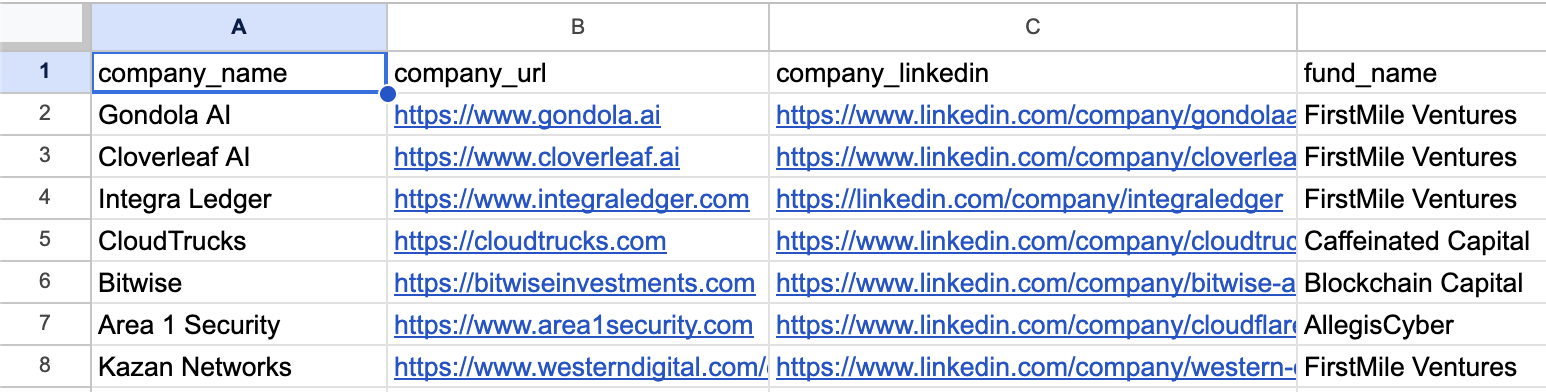
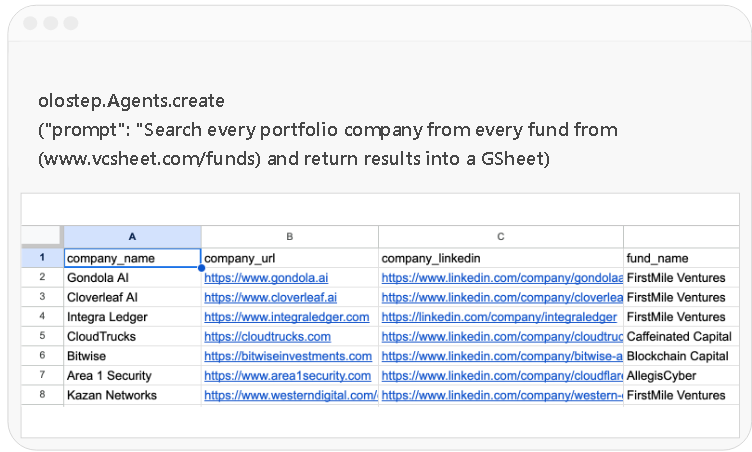
Automate complex data pipelines with the /agents endpoint through natural language prompts. You can also pass your own internal knowledge as context
olostep.Agents.create("prompt": "Search every portfolio company from every fund from (www.vcsheet.com/funds) and return results into a GSheet")
Automate complex data pipelines with the /agents endpoint through natural language prompts. You can also pass your own internal knowledge as context



Deep research agents
Enable your agent to conduct deep research on large Web datasets.

Spreadsheet enrichment
Get real-time web data to enrich your spreadsheets and analyze data.
Lead generation
Research, enrich, validate and analyze leads. Enhance your sales data
Vertical AI search
Build industry specific search engines to turn data into an actionable resource.

AI Brand visibility
Monitor brands to help improve their AI visibility (Answer Engine Optimization).

Agentic Web automations
Enable AI Agents to automate tasks on the Web: fill forms, click on buttons, etc.
Pricing that Makes Sense
We want you to be able to build a business on top of Olostep.
Start for free. Scale with no worries.
Most cost-effective web data API on the market


Top-ups
Have spiky usage or don't like subscriptions? You can buy credits pack. They are valid for 6 months.
Credit pack
Credit pack
Credit pack
Enterprise
Trusted by world-class teams
Discover why the best teams in the world choose Olostep.
Read more customer stories →

Olostep is the best!!! We automated entire data pipelines with just a prompt

Olostep has become the default Web Layer infrastructure for our company

Olostep works like a charm! And your customer service is exceptional

Olostep lets us turn any website into an API. Great product, great people

I highly recommend Olostep, great product!

We verify coupon codes at scale. Love Olostep. It works on any e-commerce

Olostep is the best API to search, extract, and structure data from the Web. Happy to be customers

We use /batches combined with parsers and it's magical how we can get structured data at large scale

Olostep allowed us to search and structure events data across the Web

Reliable and cost-effective API for working with data. Congrats on the cool product
Official Olostep integrations. Add web scraping, crawling and AI-powered search to any tool in your stack.

































Connect with your AI agents
A deterministic, repeatable, controllable pipeline that automates any web research workflow and pipeline exactly as you described it.








Use the Olostep CLI
Map, scrape, crawl, batch process, and generate answers directly from your terminal, with clean JSON output built for scripts, CI pipelines and AI agents.
# Install in under a second
npm install -g olostep-cli

# Sign in + skills + MCP server, one shot
olostep init

# Scrape any URL to clean markdown
olostep scrape https://example.com

Add Olostep to your MCP client
Works with any product that implements the Model Context Protocol: register Olostep once and call web tools from chat, agents, or IDEs that support MCP.
{
  "mcpServers": {
    "olostep-web": {
"command": "npx",
"args": ["-y", "olostep-mcp"],
"env": {
"OLOSTEP_API_KEY": "YOUR_API_KEY"
}
}
}
}
Ready to start?
Get clean data for your AI from any website with Olostep
Most cost-effective API. Built for scale
Frequently asked questions
Product & Capabilities

Olostep is the Web Data API for AI and Research Agents.
The Olostep API is the best web search, scraping and crawling API for AI used by some of the leading startups in the world.
The Olostep Agent allows anyone to automate research workflows and build data pipelines in a no code way with just a prompt in natural language
Because it's reliable (99.5%), cost-effective (up to 70% cheaper), scalable, and flexible to be compatible with your existing workflows and backend. Olostep is the only platforms where you can create your own parsers to return deterministic results at scale in a cost effective way. You can request the features you need and we will try to build them for you. Plus you can test it for free to see if it fits your need. Get your free API keys from here.
Olostep is especially useful for AI startups that rely on Web data to power or improve their services or for companies that need to enrich data, monitor websites changes, analyze historical web data and equip their AIs with web search capabilities to ground them on real world data and facts. Olostep can also be used by developers, AI engineers, data scientists, and researchers looking to use web data for market research, LLM-finetuning, and more. Olostep returns clean, structured data in one single API so that it's compatible with existing backend.
You can access and interact with any website that is publicly accessible. If you are building AI automations and your agent needs to pass cookies or login, get in touch at info@olostep.com
Yes, the API can scale to billions of requests per month
Usage & Automation
The API returns the id of the request (for future retrievals), the Markdown and the HTML of the page. You can also retrieve JSON with specific parsers or structured data with LLM extraction. If you are using the /answers endpoint as the search basis for your AI it will return an answer, a json in the schema you have defined and the sources Olostep has searched.
Reach out to us at info@olostep.com or contact our sales team https://www.olostep.com/contact-sales with your use case and we can take a look. Our aim with the Olostep Agent is to be able to automate any business data pipeline and research workflow on the Web so we will do our best to assist your use case.
Yes, Olostep lets you extract data using natural language prompts. If you know the exact URL containing your data, use the /scrapes endpoint with llm_extract and describe what you want to extract. At scale, for deterministic needs, we recommend using Olostep's parsers. For more complex tasks like searching for data, navigating between pages, handling pagination, or validating results, use the /agents endpoint that automatically finds and extracts data based on your prompt.
1 request is counted as one webpage/pdf. We don't charge you additionally for GB or for proxies and all those costs are included in the cost per request.
We don't charge for failed requests. If you are using the answer endpoint or an endpoint that needs to make LLM calls we will pass down those costs to you but on our end we only charge for successful requests.
Pricing & Plans
You can pay using the Stripe Payment Links.
Yes, plans are pro-rated, meaning if you've already paid for a previous plan, the remaining credits will be transferred to your next plan. You won't have to pay again for what you've already covered.
Yes, Olostep is free for the first 500 requests. Then paid plans start from $9/month for 5000 credits per month. Olostep is considered the most reliable and cost effective API on the market. Try it for free and see it on your own
We’re fully committed to building products that you love. If for whatever reason you’re unsatisfied with the Olostep API, please email us at info@olostep.com to receive a full refund within a few hours. We'll also refund you if it doesn't turn out being useful. If you decide to use it but only after a certain period of time, we'll refund the time you don't use it.